
Landing page banner


The Police would like to alert members of the public to a variant of malware-enabled scams where malicious files are distributed through WhatsApp to target users’ computers. No monetary losses have been reported to date, though victims may have had their personal information stolen.
In this scam variant, victims would receive messages from compromised WhatsApp accounts belonging to persons known to them, such as their friends, colleagues or supervisors, containing file attachments with seemingly legitimate or work-related file names1. Victims would then be asked to open the attachments on a computer, typically under the pretext of viewing work-related documents. In some cases, victims were also instructed to forward the attachments to their finance managers. For victims using WhatsApp Desktop or WhatsApp Web, the malware would be downloaded directly into the users’ computer devices.
Upon opening the malicious files, malware would be installed on the victims’ computers. It could then log keystrokes, capture screenshots and communicate with an external command-and-control server. In many cases, the victims’ WhatsApp accounts were taken over and used by scammers to disseminate the same malware to their contacts. In some instances, these compromised accounts were also used to solicit money from the victims’ contacts under the pretext of borrowing funds. Victims may only realise that their devices have been compromised after observing abnormal device behaviour, or when they are alerted by their WhatsApp contacts who may have received suspicious messages sent from the victims’ accounts.
Members of the public are also advised to adopt the following precautionary measures:
- ADD - Add the ScamShield app to block scam calls and filter suspicious SMSes. To enhance the security of your Whatsapp accounts, enable the “Two-Step Verification” feature on WhatsApp by going to “Settings” > “Account” > “Two-Step Verification”. Regularly check the devices linked to your WhatsApp account by going to “Settings” > “Linked Devices”, and log out of any device that you do not recognise. Adopt the Money Lock feature offered by your bank to “lock up” a portion of your savings so that it cannot be transferred out digitally, providing an added layer of protection against scams.
- CHECK – Check for scam signs and with official sources such as the ScamShield app or the 24/7 ScamShield Helpline (1799). Do not open unexpected file attachments received via WhatsApp, even if they appear to be sent by someone you know. Always verify unexpected requests with the sender through a separate communication channel, such as a phone call, before opening any attachment.
- TELL - Tell authorities and your loved ones about your scam encounters. Your sharing can prevent others from being scammed. If you suspect that you have been scammed, contact your bank immediately to block any fraudulent transactions, and lodge a Police report.
Fighting scams is a community effort. Together, we can ACT Against Scams to keep our community safe.
Annex A
Screenshots of Whatsapp Messages Received by Victims
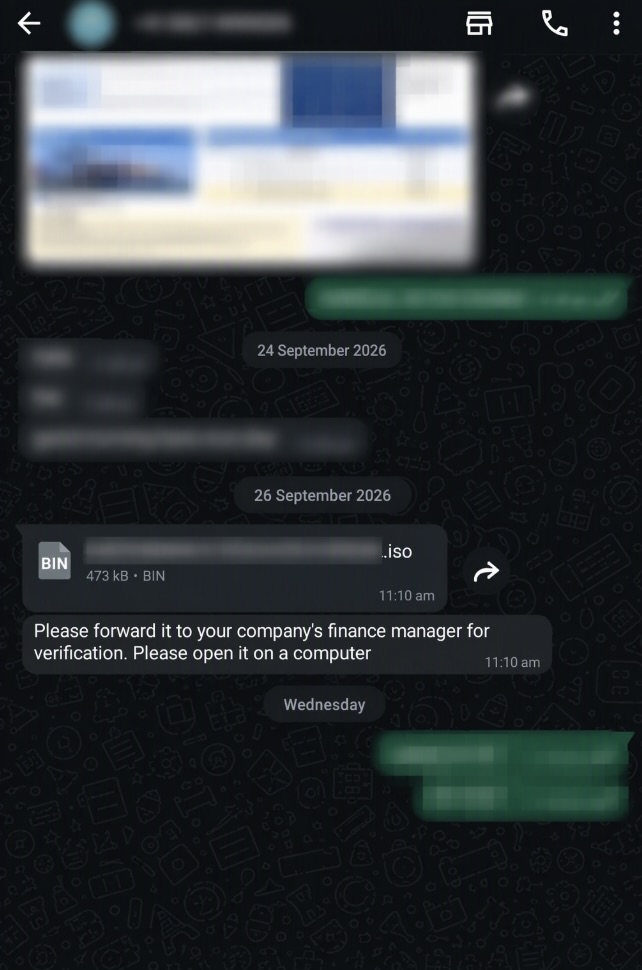
1Examples of file names observed include “Invoice 2026-09-15.iso”, “Statement of Account_54d3.zip” and “Salary Revision.rar”. The file names listed are non-exhaustive and may vary.
PUBLIC AFFAIRS DEPARTMENT
SINGAPORE POLICE FORCE
02 November 2026 @ 2:00 PM