


Ransomware is a type of malware designed to encrypt files on a device until a ransom, typically in cryptocurrency, is paid to decrypt the files.
Paying the ransom demanded is not advised for the following reasons:
-
It does not guarantee that the data will be decrypted, or that it will not be published by the perpetrators.
-
It encourages perpetrators to target more victims because ransom demands work.
-
Perpetrators may see your organisation as a soft target and may attack again in the future.
How to Report Ransomware
- Lodge an online police report. Upon lodging a police report, the Singapore Cyber Emergency Response Team (SingCERT) under the Cyber Security Agency of Singapore (CSA) will also be notified
- If you are representing an organisation that has had a data breach incident that is likely to cause significant harm* to the affected individuals, OR affects a significant scale of individuals (i.e., 500 or more), you are legally required to notify the Personal Data Protection Commission (PDPC). For more information, visit the PDPC website.
*To provide certainty to organisations on the data breaches that are notifiable, the PDP (DBN) Regulations 2021 provides the personal data (or classes of personal data) that is deemed to result in significant harm to affected individuals if compromised in a data breach. Where a data breach involves any of the prescribed personal data, the organisation will be required to notify the affected individuals and the PDPC of the data breach.
Timely reporting is necessary for law enforcement to conduct effective investigations and improve overall understanding of ransomware criminal operations.


What to do if your organisation is attacked
If you know the type of ransomware affecting your computer and are looking for a decryption tool, visit the NoMoreRansom* website to check if a solution is available.
*SPF is a supporting partner of the “No More Ransom” website, an initiative by the National High Tech Crime Unit of the Netherlands Police, Europol’s European Cybercrime Centre, Kaspersky and McAfee that seeks to help victims of ransomware retrieve their encrypted data without having to pay the criminals.
How to protect your organisation from a ransomware attack
Steps to take if you encounter a ransomware attack:
- Protect Your Systems and Data from Ransomware Attacks
- Ransomware Response Checklist
- Cyber Essentials mark: Singapore’s national cybersecurity certification standards for small organisations, including SMEs, to implement cyber hygiene for protection against common cyber attacks.
- CISO as-a-Service: Engage cybersecurity consultants appointed by CSA to develop a cybersecurity health plan for your organisation, with up to 70% funding support for eligible SMEs. Organisations impacted by cyber incidents may also approach the cybersecurity consultants for support on incident response and recovery.
- Data Protection Essentials (DPE): An initiative in promoting cybersecurity in Singapore that supports SMEs in acquiring a basic level of data protection and security practices to protect their customers’ personal data and recover quickly in the event of a data breach.
- Ransomware Guidance for Organizations - This guidance (PDF 1.1MB) aims to minimise the overall impact of a ransomware incident on an organisation and help reduce disruption and cost to businesses.
- Cybersecurity Toolkits: The Cyber Security Agency of Singapore (CSA) has tailored cybersecurity toolkits to help organisations take greater ownership of their cybersecurity. The toolkits provide information on cybersecurity issues to address common threats faced.
In collaboration with CSA

Staying ahead of ransomware trends
| S/N | Ransomeware Trends |
| 1 | Ransomware Trends 2025 |
| 2 | Ransomware Trends 2024 |
| 3 |
Ransomware Trends 2023 |
| 4 |
Ransomware Trends 2022 |
| 5 |
Ransomware Trends 2021 |
In collaboration with CSA
Read more on how to protect your systems and data from ransomware attacks.
In collaboration with CSA
1. What is ransomware?
2. How does ransomware infect your computer?
Ransomware commonly spreads through the following means:
- Phishing emails that contain malicious links or attachments. Clicking on these links typically results in the ransomware being downloaded from an external server.
- Malicious advertisements that may exploit vulnerabilities in the web browser to install ransomware, commonly known as “drive-by downloads”.
- Other methods include brute-force attacks, exploitation of insecure Remote Desktop Protocols (RDPs), unpatched Virtual Private Networks (VPNs), replication through removable media and spam campaigns.
3. How will I know if my computer is infected?
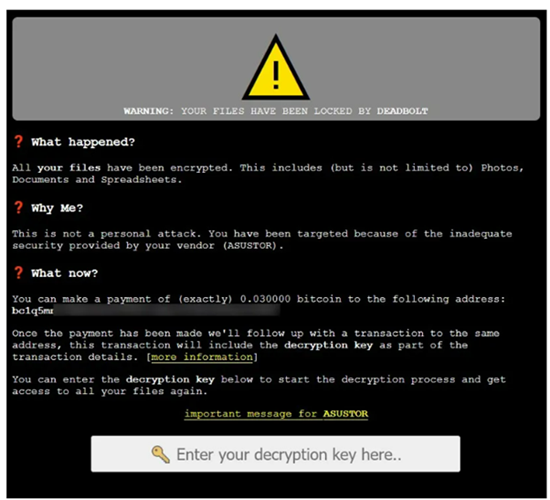
Common signs of ransomware infection include:
- Pop-up messages requesting funds or payment to unlock files.
- You cannot access your devices, or are unable to login for unknown reasons.
- Files request a password/code to access them.
- Files have been moved or are not in their usual folders or locations.
- Files have unusual file extensions, or their names or icons have changed to something odd.
Example of Ransom Note ▼
Source: BleepingComputer.com
4. How can I protect my computer from ransomware?
Here are some steps you can take to protect yourself from ransomware:
- Install anti-virus/anti-malware software and keep these (and their definition files) updated. Perform a scan of your systems and networks regularly, and scan all received files.
- Organisations can also consider implementing network segmentation that divides a larger network into smaller sub-networks with limited inter-connectivity between them. This will control traffic flow between the sub-networks, prevent lateral movement and limit the spread of ransomware, should one part be compromised.
- Use strong passphrases and enable Two-Factor Authentication (2FA) for all internet-facing services, particularly for webmail, VPNs and accounts that access critical systems.
- Be careful what you click on. Ransomware attacks often start with a malicious email or link. Be careful about clicking on links in emails from unknown senders.
- Back up your data regularly. If you have a recent backup of your data, you can restore it if your computer is infected with ransomware.
5. What should I do if I think my computer has been infected with ransomware?
- Disconnect the infected computer from all network access, storage devices and Bluetooth devices.
- Scan and disinfect PC with antivirus or anti-malware programs.
- Visit the NoMoreRansom website to find out the type of ransomware affecting your device and check on the availability of the decryption tool.
- Perform data restoration from your backup sources. Most types of ransomware create some form of persistence in the infected computer, and may re-encrypt data if not properly removed. As such, be sure to perform data restoration on a clean installation that is completely free of the malware.
- Lodge an online police report.
- If you are an organisation and have a data breach incident that is likely to cause significant harm* to the affected individuals, OR affects a significant scale of individuals (i.e., 500 or more), you are legally required to notify the Personal Data Protection Commission (PDPC). For more information, visit the PDPC website.
- If your computer has been infected, you can contact SingCERT (Singapore Cyber Emergency Response Team) to report the incident and for further advice on what to do.
- If your organisation is a victim of ransomware, you may refer to CSA’s ransomware response checklist on steps to identify, contain, remediate and recover.
6. Should I pay the ransom?
7. What should I do if I have already paid the ransom and my files are still encrypted?
Ransomware is a cybercrime and should be reported to the Police. For any data breaches, report to the Personal Data Protection Commission (PDPC).*
*Note: If you are an organisation and have a data breach incident that is likely to cause significant harm* to the affected individuals, OR affects a significant scale of individuals (i.e., 500 or more), you are legally required to notify the Personal Data Protection Commission (PDPC).
8. How can I prevent ransomware attacks?
The best way to prevent ransomware attacks is to take steps to protect your computer from malware. You can do so by following the steps below to ensure that your devices are adequately protected against malware:
- Ensure that your mobile phones and computing devices are updated regularly with the latest OS versions and install anti-virus applications that can detect and remove malware.
- Download files, including applications and updates, directly from official verified sources as this ensures that downloaded files are free from malware or viruses.
- Backup your data regularly in a separate system and keep it offline to retain access to your data in the event of a ransomware incident. Such data backups can be done using an external hard disk that is disconnected from your devices or in the Cloud.
- Avoid clicking on suspicious-looking links and pop-up ads or opening files and email attachments from unknown senders.