
Landing page banner


The Police would like to alert members of the public to remain vigilant against social media impersonation scams that arise from compromised WhatsApp accounts. Since 1 April 2026, there have been at least 52 reported cases, with total losses amounting to at least $46,000.
In these cases, the scammers would attempt to log into the WhatsApp accounts of other WhatsApp users, by entering the users’ mobile numbers and requesting for a WhatsApp verification one-time password (OTP). This would trigger an SMS or WhatsApp notification containing the OTP to the users. The users would thereafter receive WhatsApp messages from known contacts whose WhatsApp accounts had already been compromised. The users would be asked to provide the OTP on the pretext that the code was intended for the known contacts but had been accidentally sent to them. The scammers would be able to log into the users’ WhatsApp accounts using the OTP provided.
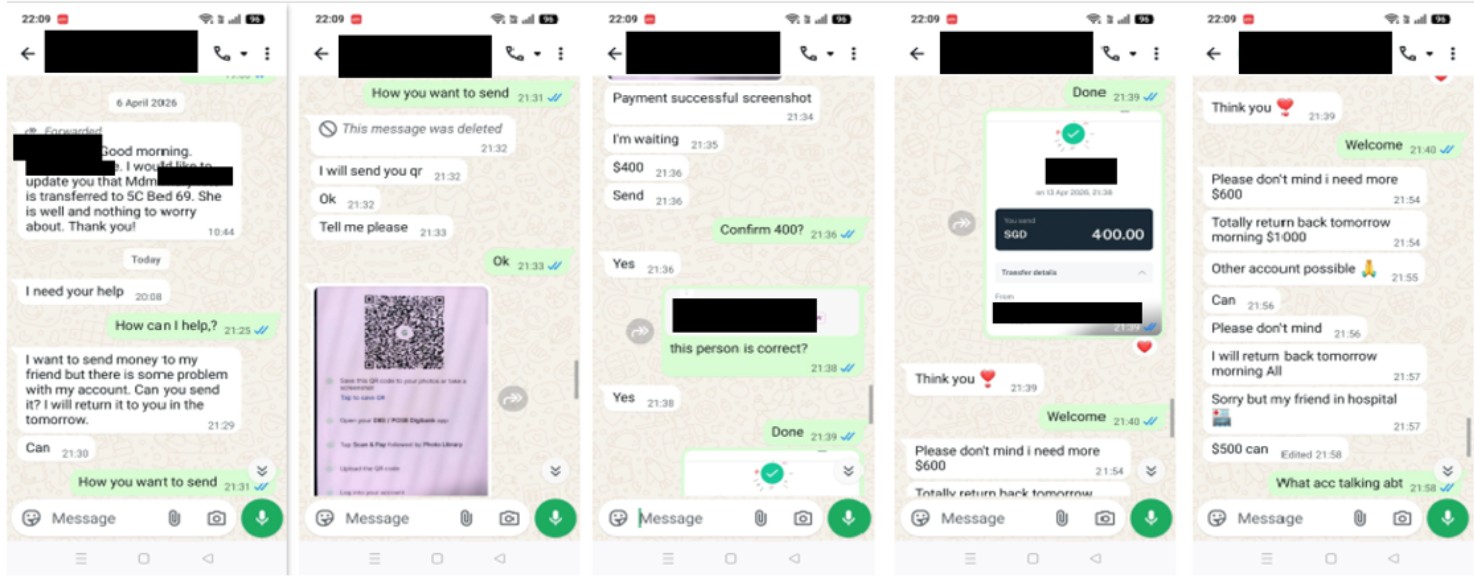
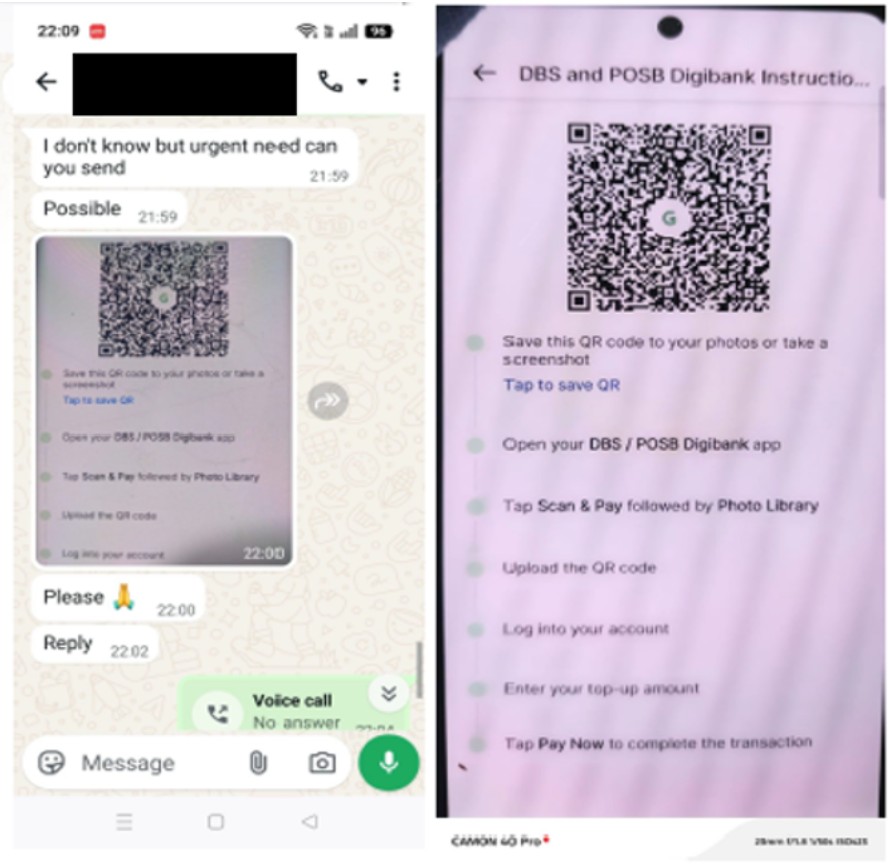
Using these compromised WhatsApp accounts, the scammers would impersonate the WhatsApp users and reach out to the victims, who are the contacts found within the compromised WhatsApp accounts. The scammers would cite various reasons (e.g., need for an emergency loan) to deceive the victims into transferring money through various means (e.g., via PayNow QR codes) to digital payment service providers, such as Razer Merchant Services and Grab. Some victims were told to make more transfers after completing the initial transfers. The victims realised that they had been scammed after making verifications separately with the WhatsApp accounts’ users.
The Police would like to remind members of the public to be wary of unusual requests for money received over WhatsApp. Never relinquish WhatsApp OTPs to anyone as you will lose access to your WhatsApp accounts as a result.
- To secure your WhatsApp account, remove unknown devices linked to your WhatsApp account by going to ‘Settings’ > ‘Linked Devices’. Enable the ‘Two-Step Verification’ feature on your WhatsApp account by going to ‘Settings’ > ‘Account’ > ‘Two-step verification’ > ‘Enable’.
- If your account is compromised, or if you lose access to your account, follow the steps to recover your account. Tap Log back in > Continue.
If prompted, enter your full international phone number and tap Next > Ok.
Enter the 6-digit code you receive via SMS or phone call. For more information, you may refer to https://faq.whatsapp.com > How to recover a compromised account.
Members of the public are strongly advised to adopt the following precautionary measures:
- ADD - ScamShield app to block out scam calls and filter out scam SMSes. Set up security features on WhatsApp. For information on WhatsApp’s security features, visit https://www.whatsapp.com/security.
- CHECK - scam signs with official sources (e.g., ScamShield app or ScamShield website at www.scamshield.gov.sg).
- TELL - authorities, family, and friends if or when you encounter scams.
For more information on scams, members of the public can visit www.scamshield.gov.sg or call the 24/7 ScamShield helpline at 1799.
Annex
Screenshots of Conversations between Scammers and Victims
PUBLIC AFFAIRS DEPARTMENT
SINGAPORE POLICE FORCE
08 May 2026 @ 11:30 AM