
Landing page banner


xThe Singapore Police Force (SPF) and the Cyber Security Agency of Singapore (CSA) would like to alert members of the public to remain vigilant against technical support scams involving impersonation of Microsoft. Since February 2026, there have been at least 10 reported cases, with total losses amounting to at least $1.7 million.
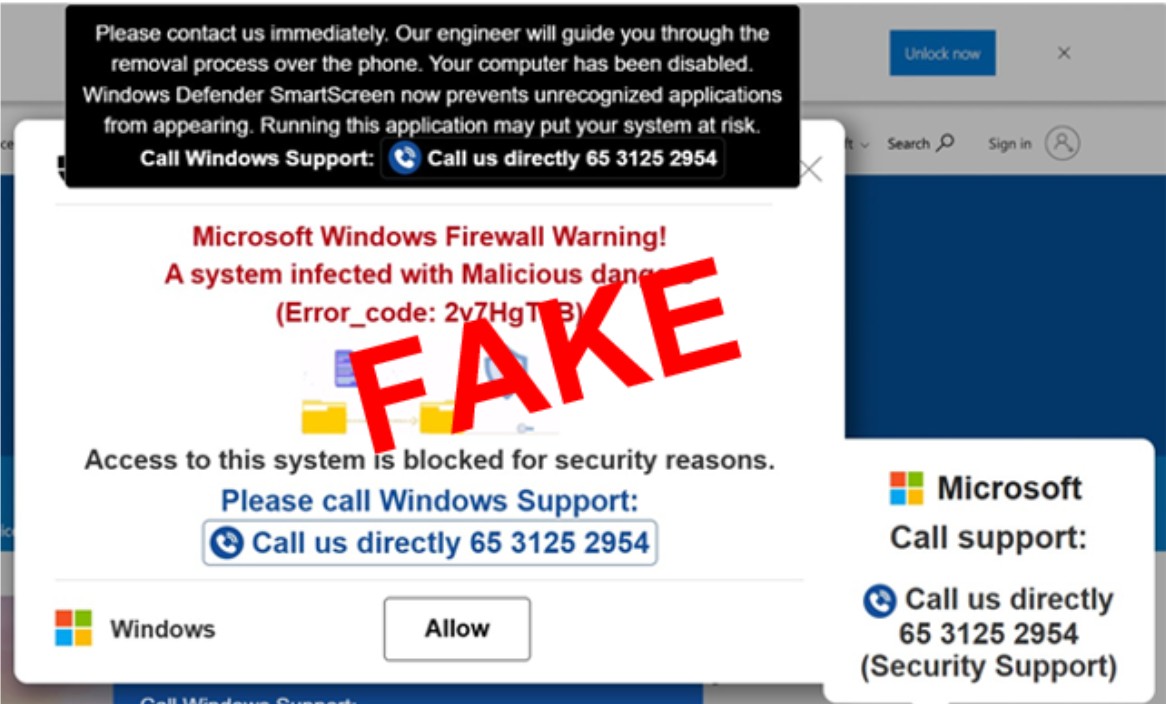
In this scam variant, the victims would typically encounter a pop-up alert on their computer’s internet browser. The alert would purportedly be from Microsoft, to inform the victims that their devices had been hacked or compromised. To resolve the issue, the victims would be required to contact a “technical support officer” via an internet-based phone number (i.e., an eight-digit phone number which starts with “3”).
Upon contacting the “technical support officer”, the victims would be transferred to speak to another scammer impersonating a police officer. The victims would be informed that their device had been used for illegal activities such as money laundering. They would be instructed to make bank transfers or provide banking credentials to assist with Police investigations. In some cases, the victims were instructed to grant remote access of their devices to the scammers by downloading remote access applications or by clicking a link which would allow the scammers to take control of the victims’ bank accounts. The victims realised they had been scammed when unauthorised transactions were made in their bank accounts.
Members of the public are advised to verify the authenticity of such alerts through your respective software providers’ official channels. Microsoft does not include phone numbers in its error or warning messages. If you encounter suspicious pop-up alerts, you should refrain from calling any numbers displayed, avoid clicking any links or buttons within the alerts, and close them by exiting the browser. Some pop-ups may cause your browser to enter full-screen mode. You can exit full-screen mode by pressing F11 (Windows) or the Escape key. If the pop-up cannot be closed, use Task Manager (Windows) to close the browser manually.
If you believe you have fallen prey to such a scam, you should immediately:
- Disconnect your computer from the internet or power your computer off to prevent further unauthorised access;
- Contact your bank to halt any unauthorised transactions;
- Remove any applications installed at the scammer's instructions;
- Perform a full anti-virus scan and delete any malware detected;
- Change your account passwords and banking credentials using a separate trusted device;
- Remove any unauthorised payees added to your bank accounts; and
- Report the incident to the Police and to CSA's SingCERT at singcert@csa.gov.sg or via the reporting form at www.csa.gov.sg/singcert/reporting.
Members of the public are reminded that government officials will never, over a phone call or email, ask you to transfer money, disclose your banking log-in details, install mobile applications from unofficial app stores, or transfer your call to the Police.
Members of the public are advised to adopt the following precautionary measures:
- ADD - ScamShield App to protect yourself from scam calls and SMSes. Set security features (e.g. set up transaction limits for internet banking transactions, enable Two-Factor Authentication (2FA) for banking apps).
- CHECK – scam signs with official sources (e.g., ScamShield app or ScamShield website at www.scamshield.gov.sg). Ensure that your computer’s security software is updated regularly. For more information on anti-virus software and device security matters, you may visit www.csa.gov.sg/resources/videos/better-cyber-safe-than-sorry/how-to-choose-anti-virus/.
- TELL - authorities, family, and friends if or when you encounter scams.
For more information on scams, members of the public can visit www.scamshield.gov.sg or call the ScamShield Helpline at 1799. Fighting scams is a community effort. Together, we can ACT Against Scams to safeguard our community!
Screenshot of the Pop-Up Alert
PUBLIC AFFAIRS DEPARTMENT
SINGAPORE POLICE FORCE
09 June 2026 @ 10:35 PM