
Landing page banner


The Police would like to remind members of the public to remain vigilant against government official impersonation scams involving the use of malware on Android devices targeting senior citizens. Since 1 April 2026, at least eight cases were reported with total losses amounting to at least $69,000.
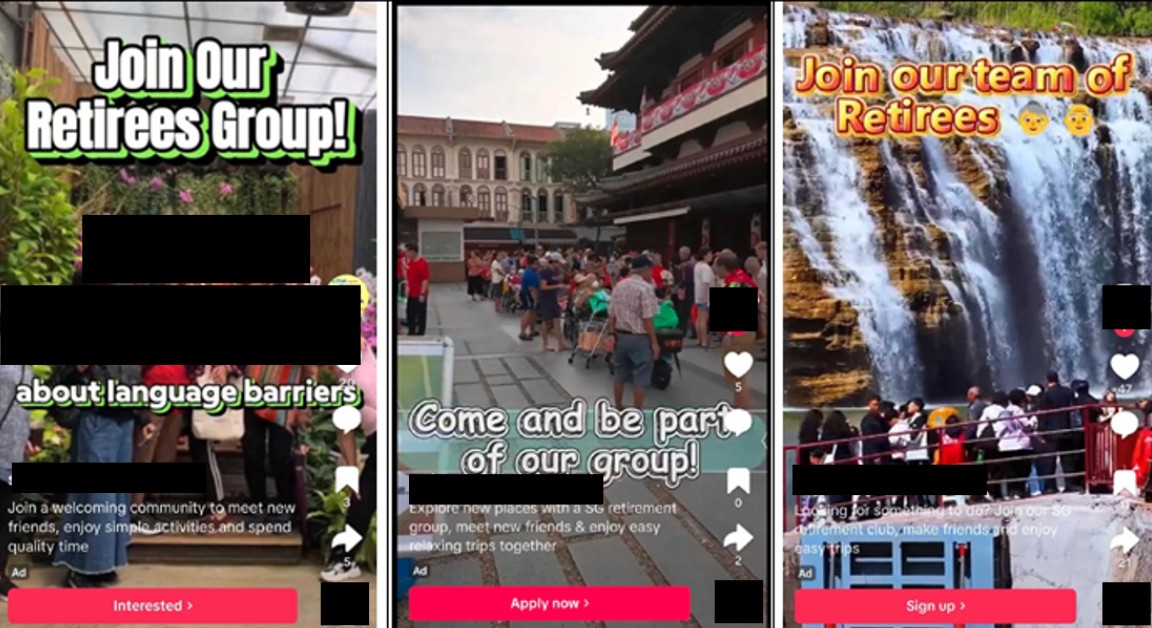
In this scam variant, the victims would come across advertisements on Facebook or TikTok promoting activities for senior citizens. Upon submitting their contact details to express interest, the victims would be contacted by scammers via WhatsApp and instructed to download an Android Package Kit (APK) file, purportedly to view a list of activities. Some victims subsequently discovered that their Singpass or ScamShield applications had been uninstalled from their devices. In one case, a victim discovered that his bank transaction limit had been increased without his authorisation.
Subsequently, the victims would be contacted by a scammer impersonating an official from the Ministry of Law (MinLaw) or the Anti-Scam Centre (ASC) of the Singapore Police Force (SPF). The scammer would claim that the victims’ devices had been compromised by an illegal mobile application, and instruct the victims to transfer money or hand over valuables (e.g., gold and mobile phones), purportedly to assist with Police investigations. Victims only realised they had been scammed when they grew suspicious of the transactions or when they checked with the relevant authorities.
Members of the public are reminded to:
- Never share personal contact details, transfer, or hand over monies or valuables to unknown persons or persons whose identity you have not verified;
- Never leave monies or valuables at a physical location to facilitate subsequent collection;
- Never make configuration changes to your device based on instructions from unknown persons or unverified sources;
- Never download any files from unfamiliar or unverified sources;
- Only download and install applications from official app stores (e.g., Apple Store, Google Play Store).
Singapore Government officials will never:
- Ask you to transfer or hand over money, valuables such as luxury watches, gold or cryptocurrency;
- Ask you to disclose banking login details;
- Ask you to install mobile apps from unofficial app stores; or
- Transfer your call to the Police or any other government officials.
Members of the public are encouraged to adopt the following precautionary measures:
- ADD – Add the ScamShield application to protect yourself from scam calls and SMSes. Set security features (e.g., set up transaction limits for internet banking transactions). Add and/or update security applications to scan for the latest malware. Visit www.csa.gov.sg for the recommended list of security applications. Update your device’s operating systems and applications regularly to be protected by the latest security patches. Enable Google Play Protect on your device and never disable it. Disable “Install Unknown Applications” or “Unknown Sources” in your phone settings.
- CHECK – Check for scam signs with official sources. Check the legitimacy of suspicious messages, phone numbers, and website links via the ScamShield application or the ScamShield website at www.scamshield.gov.sg.
- TELL – Tell the authorities, family, and friends about scams. Report any fraudulent transactions to your bank immediately.
If you have already downloaded and installed a suspicious application, or suspect that your device is infected with malware, please take the following steps:
- Turn on “flight mode” on your device. Check that Wi-Fi is switched off and do not switch it on.
- Run an anti-virus or Google Play Protect scan on your device.
- Check your bank account/Singpass/CPF for any unauthorised transactions using other devices.
- Continue to keep your device in “flight mode” and do not perform a “factory reset” before reporting the incident to the Police as this could hinder investigations.
- As a further precaution, perform a “factory reset” of your device and change important passwords after the matter is reported to the Police.
If you are in doubt, call the 24/7 ScamShield Helpline at 1799 to check. Fighting scams is a community effort. Together, we can ACT Against Scams to safeguard our community.
Annex A – Screenshot of Advertisements on TikTok
PUBLIC AFFAIRS DEPARTMENT
SINGAPORE POLICE FORCE
18 June 2026 @ 2:45 PM